
How to Write a LinkedIn About Section That Gets You Hired

.webp)
A step-by-step playbook with plug-and-play templates, real examples, and a self-scoring checklist so you can stop sounding like everyone else.
Your LinkedIn About section is the one place on your entire profile where you get to talk like a human. No job titles forced into boxes. No date ranges. No rigid formatting. Just your story, your proof, and your pitch.
And most people waste it.
They fill it with adjectives nobody can verify ("passionate, results-driven professional"), or they leave it blank, or they copy-paste their resume summary and call it done. Then they wonder why recruiters never message them.
If you're Googling "how to write a LinkedIn About section that gets you hired," you're not trying to write a cute bio. You're trying to do something very specific: turn profile views into recruiter messages, interview invites, and referrals.
That's exactly what this guide will help you do. By the end, you'll have:
A paste-ready About section built for your target role
A repeatable 25-minute method to tailor it for different career lanes
A self-check rubric to validate it's searchable, credible, and not cringe
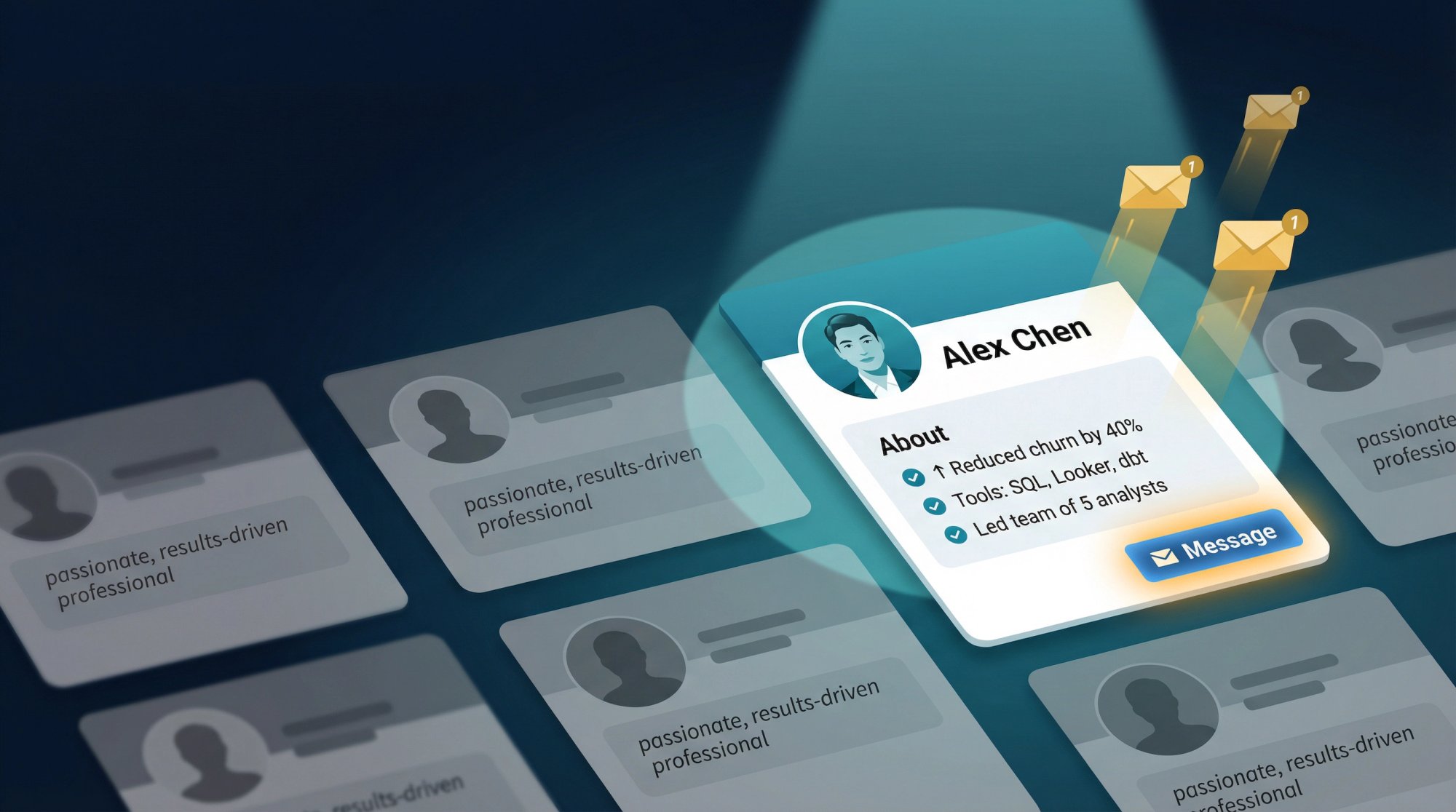
We built this guide at AIApply because we see thousands of LinkedIn profiles every week through our tools, and the pattern is always the same: the profiles that generate inbound interest follow a specific structure. The ones that don't, well, they sound like everyone else.
Why Your LinkedIn About Section Determines Who Contacts You
LinkedIn describes the About section as an open-ended space with a maximum of 2,600 characters where you define yourself in your own words. That sounds simple. But think about what it actually means.
Every other part of your profile is structured. Your headline follows a format. Your experience section has job titles, companies, and dates. Your skills are selected from a predefined list.
The About section is different. It's yours. And that's exactly why most people mess it up. They treat it like another form to fill out instead of what it actually is: a conversion page.
The real question isn't "What do I write about me?"
The real question is: What do recruiters and hiring managers need to see in 15 seconds to believe you're worth messaging?
That reframe changes everything about how you write it. If you're wondering whether LinkedIn is even worth the effort of optimizing in the first place, AIApply's guide on whether LinkedIn is worth it lays out the honest answer.
How 2026 Changed What Recruiters Want on LinkedIn
If you write your About section like it's 2018, it'll read like a museum exhibit. The hiring landscape has shifted dramatically, and your profile needs to keep up.
The numbers tell a clear story:
LinkedIn research published January 2026 reports that 52% of people globally are looking for a new role in 2026, and that US applicants per open role have doubled since spring 2022. Competition isn't a possibility. It's the default.
That same research says 66% of recruiters say it's become harder to find qualified talent, and 93% of recruiters plan to increase their use of AI in 2026. Your profile is being scanned and filtered more aggressively than it used to be, by both humans and algorithms.
And there's another layer. LinkedIn also reports that verified members get 60% more profile views and 30% more connection requests, and are more likely to hear back during job searches. Trust signals are carrying real weight now.
At the same time, hiring teams are growing increasingly skeptical of polished, same-sounding application materials because AI can generate "good sounding" fluff at scale. Multiple outlets have reported employers shifting toward proof of skills, portfolios, and real work samples rather than buzzword-heavy documents.
So the About section that gets you hired in 2026 has to do two things at once:
You can't pick one. You need both.
How Recruiters Actually Read Your LinkedIn Profile
Before you write a single word, you need to understand how your audience actually operates. A recruiter isn't reading profiles like novels. They're doing pattern matching under time pressure.
Their workflow looks like this:
① Search → They use filters and keywords to find profiles that match a role.
② Skim → They scan the top of your profile fast (think seconds, not minutes).
③ Decide → Message, save, or move on.
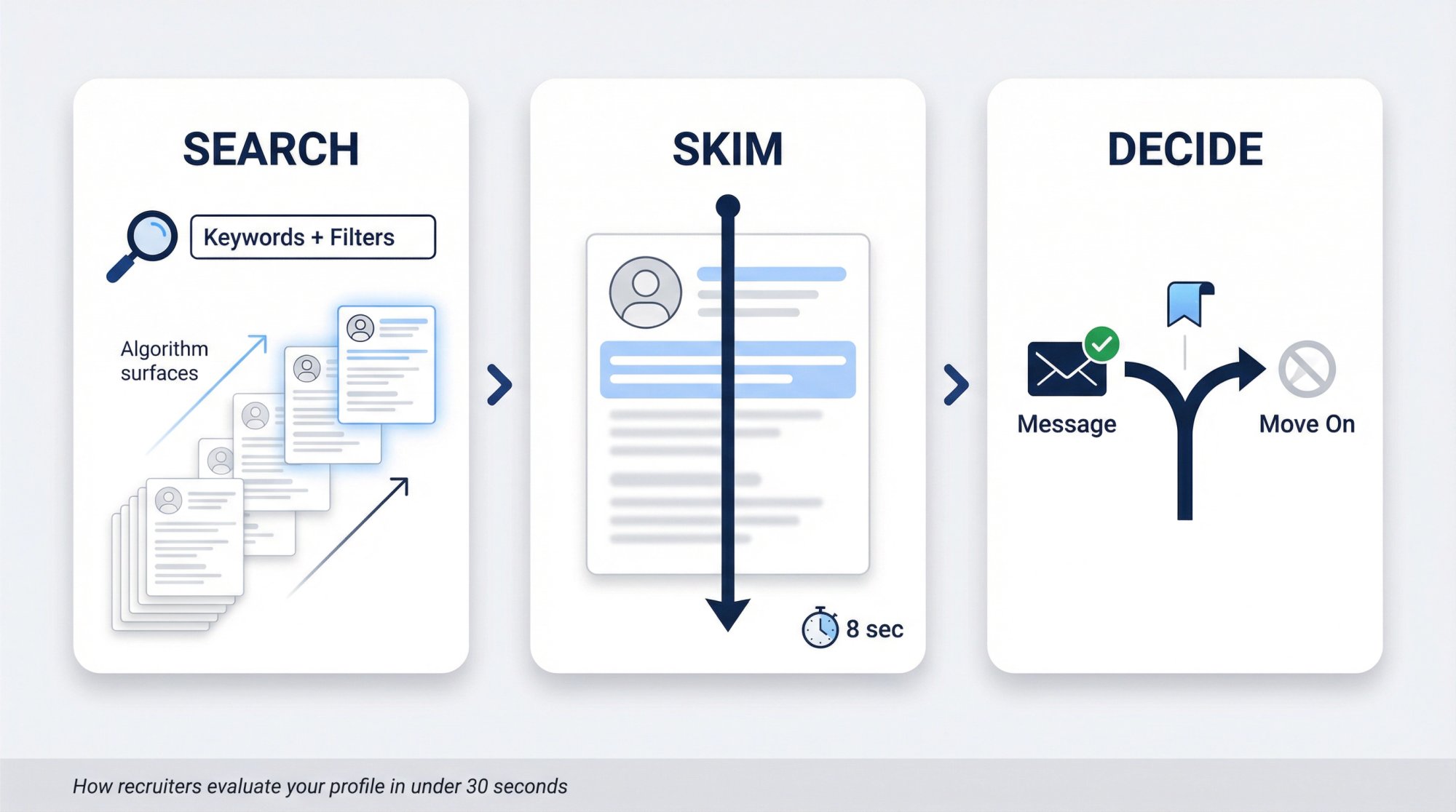
LinkedIn Recruiter is explicitly built around this. LinkedIn's own Recruiter guidance highlights 40+ advanced search filters, keyword filters, Boolean strings, and matching systems to narrow results.
That tells you something important: even if you're amazing, you can't be selected if the system can't surface you. Your About section needs the right keywords for step one. Understanding how to get noticed by job recruiters beyond the profile itself is also worth reading alongside this guide.
But it also tells you a second thing. When your profile does get opened, the reader won't "read" it. They'll scan for evidence. Your About section needs to deliver proof fast for step two.
Your About section is the bridge between "found" and "trusted." Get the keywords right to be found. Get the proof right to be trusted.
The 3 Things Your LinkedIn About Section Must Accomplish
A hired-getting About section doesn't need to be long. It doesn't need to be literary. It needs to do exactly three jobs.
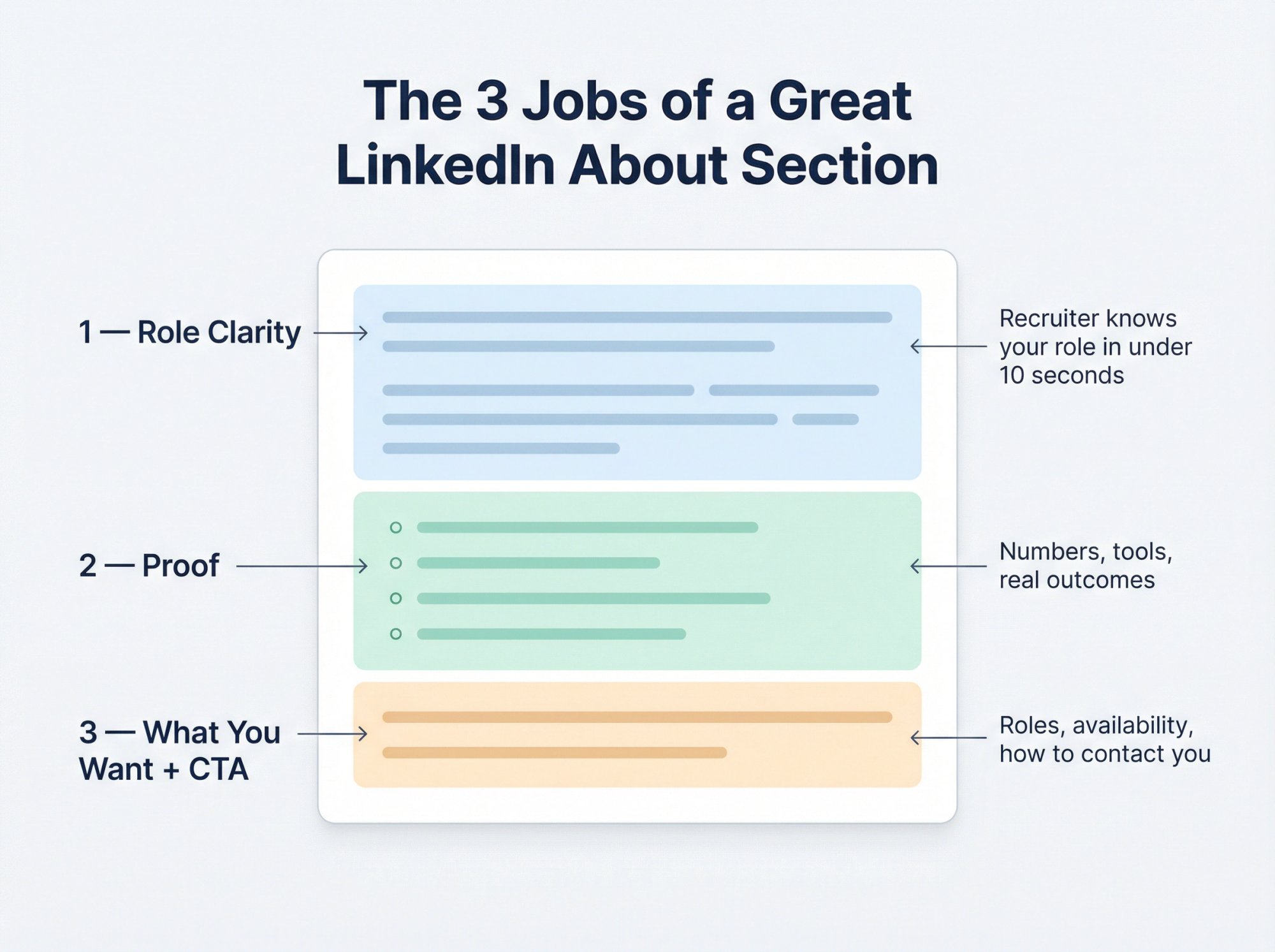
Job 1: Make Your Role Clear in the First Two Lines
In under two lines, a recruiter should know:
What role you are (or want)
What domain you operate in
What kind of problems you solve
If a recruiter has to guess what you do, they'll move on. Make placement obvious.
Job 2: Back Every Claim With Measurable Proof
Most About sections are claims with no receipts. "Results-driven" means nothing. "Managed a team" means almost nothing. Proof looks like:
Outcomes: numbers, scope, speed, savings, growth
Tools and methods you actually used
Specific types of work: pipelines, audits, onboarding, forecasting, incident response
Credible signals: certifications, publications, patents, shipped products, client logos you can name
Job 3: Tell Recruiters What You Want and How to Reach You
You want a clear next step:
What roles you're open to
How to contact you
What you're happy to chat about
LinkedIn's own best-practice guidance explicitly recommends making the first sentence count, including keywords, cutting jargon, writing like you speak, using first person, creating white space, and asking for what you want.
That's basically a conversion page checklist. So let's build yours like one.
How to Write Your LinkedIn About Section in 25 Minutes
This is the fastest way we've found to write something that sounds real and performs well. We developed this method at AIApply after analyzing patterns across thousands of profiles, and it breaks the writing process into six concrete steps you can knock out in a single sitting.
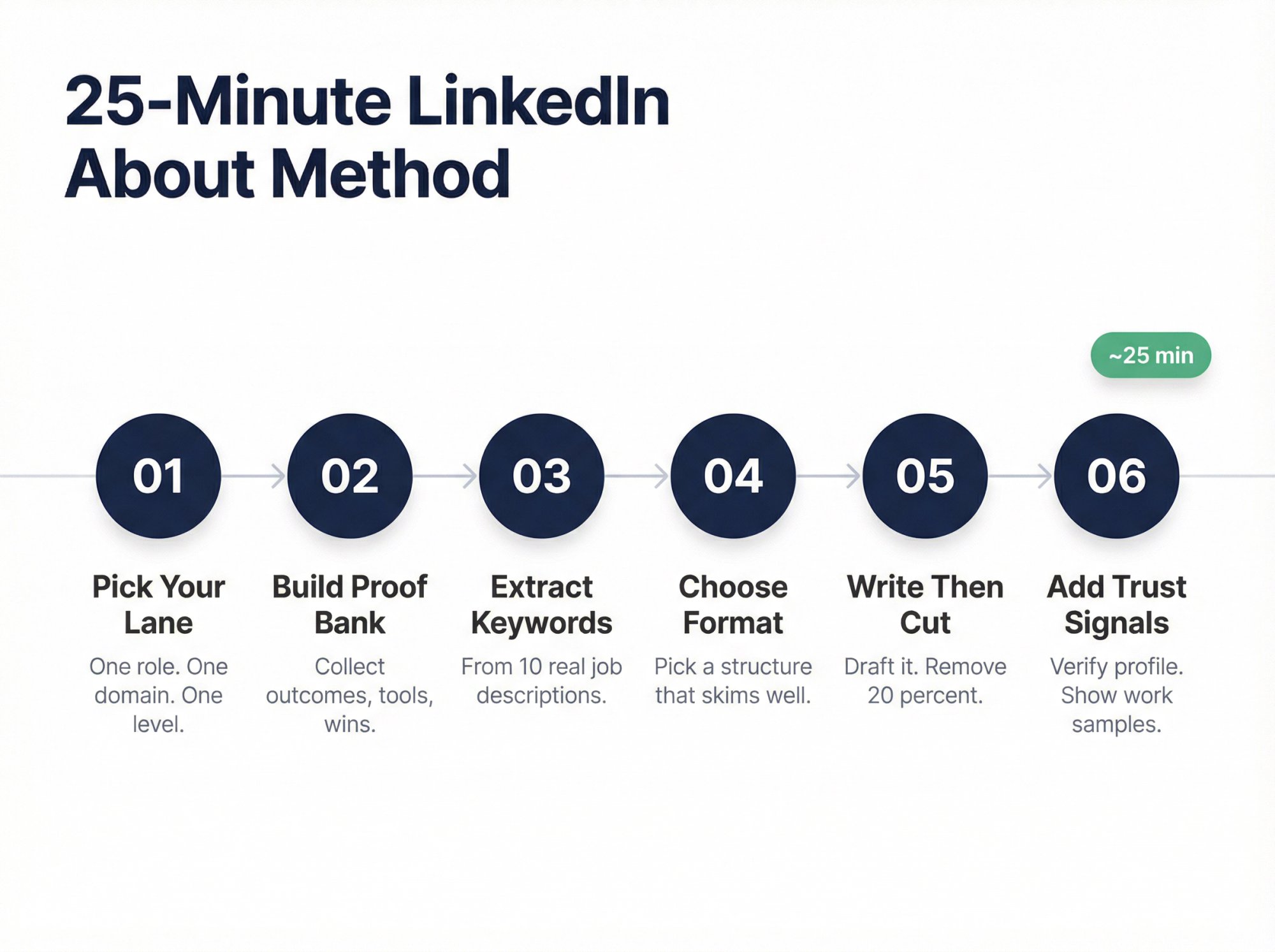
Step 1: Pick One Target Role and Industry
Most people fail because they try to be hireable for everything at once. Your About section should speak directly to one type of role.
Pick one lane for this version:
Target title (pick 1 primary): "Data Analyst," "Backend Engineer," "Customer Success Manager," etc.
Target domain (pick 1): fintech, SaaS, healthcare, e-commerce, etc.
Target level: entry, mid, senior, lead
If you genuinely have two lanes, create two versions and swap them depending on what you're applying to. Your profile is not a tattoo. You can change it any time you shift focus.
Step 2: Build a Proof Bank of Your Best Outcomes
Open a notes app and answer these prompts with raw bullets. Don't try to write nicely yet. Just collect evidence.
① What are 3 outcomes you drove that someone could verify?
② What did you improve: revenue, cost, time, risk, quality, customer experience, reliability?
③ What tools did you use in the last 12 months that appear in job descriptions?
④ What's your "signature strength" (the thing people rely on you for)?
⑤ What's your strongest artifact: portfolio, GitHub, deck, case study, product you shipped, talk you gave?
You're collecting evidence, not writing prose. The writing comes later.
Step 3: Extract Keywords Directly From Job Descriptions
This is where most advice gets lazy. People say "include keywords" but don't explain which keywords or how to find them.
Don't guess. Extract them.
Go to 10 job posts that match your target role and pull out:
Recurring skills and tools
Recurring role phrases and titles
Domain-specific words (payments, SOC2, claims processing, churn, etc.)
If you want this done in minutes instead of an hour, use AIApply's Job Description Keyword Finder to extract and categorize keywords from a job posting automatically. It breaks them down into hard skills, soft skills, tools, certifications, and more. Paste in a job description, and you'll get a structured keyword list you can weave into your About section.
This step isn't about stuffing keywords. It's about speaking the same language as the roles you want. For a deeper look at how ATS systems filter candidates before a human ever sees your profile, read what an ATS is and how to beat it.
Step 4: Choose a Format That Skims Well
You're going to paste your proof into a structure that skims well. Use the 6-block framework we cover in the next section. It's designed to match how recruiters actually read.
Step 5: Write a Draft, Then Cut 20 Percent
Your first draft will be too long and too polite. That's normal.
Go back and cut:
Greetings ("Hi, thanks for visiting...")
Generic adjectives ("hardworking," "results-driven")
Anything you can't prove
LinkedIn explicitly warns against filler openers and buzzword-heavy phrasing and recommends getting to the substance immediately.
Step 6: Add Verification and Trust Signals
Optional but high leverage in 2026:
Verify your profile information. LinkedIn reports measurable boosts for verified members.
Consider enabling "Open to Work" if you want inbound recruiter interest.
Make it easy to see your work samples in your Featured section.
If you want to speed up Steps 1 through 5 significantly, AIApply's Professional Bio Generator can create a solid first draft for your LinkedIn About section in under two minutes. You choose the tone, length, and focus. Then you edit, add your proof points and keywords, and make it yours. It's a starting point, not a replacement for your voice.
The 6-Block LinkedIn About Section Structure That Gets Read
Here's the structure that consistently converts, because it matches how humans skim. We call it the 6-block About section.
LinkedIn's own guidance aligns with this approach: lead strong, include keywords, avoid jargon, and use formatting that supports skimming.
The logic is simple. Every block answers a recruiter's next question in the order they naturally ask it: Who is this? Can they do the job? Should I believe them? What do they want? How do I reach them?
LinkedIn About Section Templates for Every Career Situation
Pick the template that matches your situation. Fill it in. Paste it into your LinkedIn About section. Then edit until it sounds like you, not like a template.
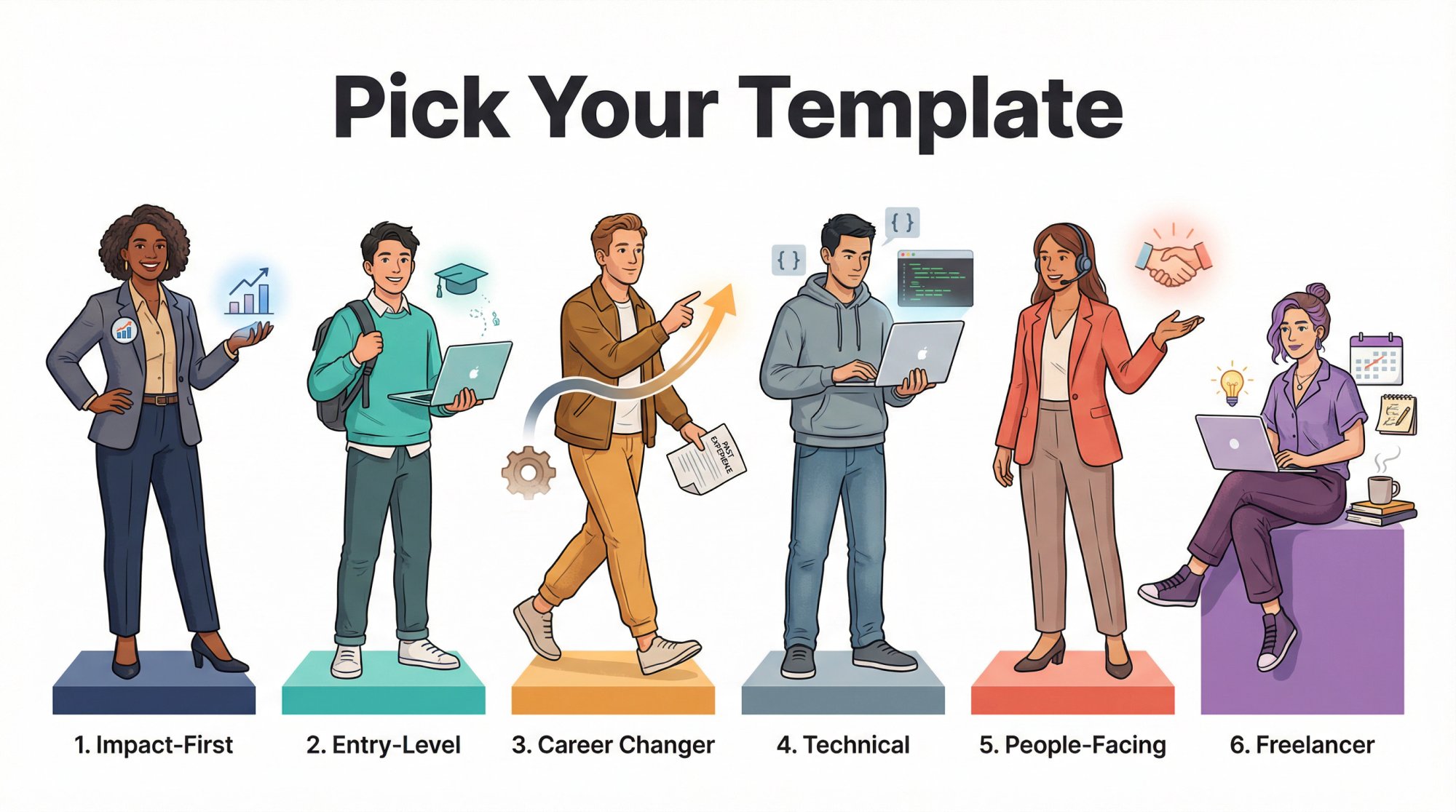
Template 1: Impact-First LinkedIn About Section
Use this if you have any real work experience (internships count).
I help [type of team/company] [do outcome] by [your specialty]. Most recently, I [proof in one line].
I'm a [target role] with [X years OR level] experience in [domain/industry], focused on [2 to 3 key strengths].
Highlights:
[Outcome] by [action] (impact: [metric])
[Outcome] by [action] (impact: [metric])
Built/owned [system/process/project] using [tools]
Partnered with [stakeholders] to [result]
My working style: [how you operate]. I'm known for [edge] and [edge].
I'm currently targeting [roles] in [location/time zone] (open to [remote/hybrid/on-site]).
If you're hiring for [role] or want to chat about [topic], message me here.
Once you've written your About section, you'll want your resume to match. AIApply's AI Resume Builder makes it easy to create a role-specific resume that reinforces the same story your LinkedIn profile tells.
Template 2: Entry-Level and Student LinkedIn About Section
Use this when you have projects, coursework, internships, volunteering, or self-driven work.
I'm a [target role] in progress, building toward [domain] work where I can [outcome].
Right now, I'm focused on:
Projects: [project name]: [what it does] (built with [tools], result: [metric or learning])
Skills: [skills cluster]
Strength: [your edge] (example: [tiny proof])
I learn fast, but more importantly, I ship: [what you shipped].
I'm looking for [internship/entry role] opportunities in [location]. If your team needs someone who can [specific contribution], I'd love to connect.
If you're at the start of your career, preparing for those first conversations is just as important as the profile. AIApply's entry-level interview preparation guide walks you through exactly what to expect and how to prepare before the message turns into a meeting.
Template 3: LinkedIn About Section for Career Changers
This template answers the real objection: "But have you done the job before?"
I'm transitioning from [previous field] into [target role] because [reason that signals fit].
What carries over (and why it matters):
What I've built in the new lane:
- [Project/cert]: [what you did] using [tools]
I'm targeting [roles] in [domain] and I'm strongest in [niche]. If you want someone who already knows how to [hard thing] and now applies it to [target role work], let's talk.
Career transitions require more than a great About section. If you're navigating a full career change, AIApply's guide on the best jobs for career changers can help you identify which industries and roles are most receptive to your background. And if you're making the switch later in your career, career change at 40 addresses the specific questions and objections that come with that territory. You'll also want a sample resume built for a career change that tells a coherent story alongside your profile.
Template 4: LinkedIn About Section for Technical Roles
Use this when recruiters care about stack and scope.
I'm a [role] who builds [systems/products] that [outcome: reliability, speed, cost, security].
Recent work:
[Built/optimized] [thing] using [stack] (impact: [metric])
[Reduced incidents/latency/cost] by [method] (impact: [metric])
Shipped [feature] with [stakeholders] (result: [metric])
Tools I use regularly: [tool list]
Strengths: [system thinking / debugging / ownership / shipping]Open to [roles] in [domain]. If you're hiring for [specific niche], message me.
If you're a backend engineer writing this template, check out open backend developer roles and backend developer resume examples to understand exactly what hiring managers want to see from candidates in your lane. Data professionals have the same resource available: browse open data analyst roles and data analyst resume examples to calibrate your proof points and tool list. If you're positioned as an analytics engineer, the analytics engineer resume examples and analytics engineer salary data are worth reviewing to frame your positioning and negotiation leverage.
Template 5: LinkedIn About Section for People-Facing Roles
Use this when outcomes and communication matter.
I help [customer type] [achieve outcome] through [your approach].
In the last [timeframe], I:
[Grew revenue / pipeline / retention] by [action] (impact: [metric])
[Improved process] that reduced [thing] (impact: [metric])
Worked cross-functionally with [teams] to [result]
I'm strongest when I can combine [skill 1] + [skill 2] + [skill 3] to move outcomes, not just activity.
Looking for [roles] in [industry]. If you want someone who can [specific outcome], let's connect.
For Customer Success professionals using this template, take a look at Customer Success Manager resume examples and the skills that make top Customer Success Managers stand out. If you're in sales, account executive resume examples show how the strongest candidates frame their pipeline and quota numbers. For product managers, product manager resume examples and open product manager roles are good benchmarks for what proof points land best.
Template 6: Freelancer LinkedIn About Section Template
Use this if you want inbound clients (also works for "open to contract" roles).
I work with [client type] to [result] without [pain they hate].
Typical projects:
If you need help with [3 services], message me. Happy to share examples of past work.
If you're building toward a freelance or contract career, understanding what a contractor job actually involves and the structures that come with it will help you position yourself accurately in your About section and in conversations with potential clients.
Pro tip: If you're not sure which template fits, start with Template 1. It works for about 80% of job seekers. And if you want a quick starting draft before filling in a template, AIApply's Professional Bio Generator can get you a solid first version in under two minutes.
LinkedIn About Section Before and After Examples
Templates are helpful. But seeing actual transformations makes the principles click. Here are two rewrites that show exactly what changes and why.
Example A: Rewriting a Vague Generic About Section
Before:
"I am a passionate, results-driven professional with strong communication skills and a proven track record of success. I thrive in fast-paced environments and love working with teams to deliver value."
Why this fails:
It could describe 10 million people
Nothing is provable
No target role. No domain. No outcomes.
After:
"I help SaaS teams reduce churn by turning messy customer feedback into retention experiments that actually ship.
Most recently, I partnered with Product and Support to rebuild onboarding and deflection flows, cutting time-to-first-value and improving renewal conversations.
Highlights:
Reduced churn drivers by launching 12 retention experiments across onboarding and in-app education
Built a customer insight loop from tickets, calls, and product analytics to prioritize roadmap themes
Strongest in: onboarding, lifecycle messaging, and cross-functional execution
I'm targeting Customer Success or Lifecycle Marketing roles at B2B SaaS companies. If you're hiring for retention-focused roles, message me."
What changed: The role and domain are immediately obvious. Proof exists. It ends with a clear ask. If you're pursuing Customer Success roles, explore open Customer Success Manager positions and cover letter examples for Customer Success Managers to round out your application materials.
Example B: Rewriting a Resume-Dump About Section
Before:
"2019-2021: Company A. 2021-2023: Company B. I did X, Y, Z. Responsible for A, B, C."
Why this fails:
Your Experience section already has dates
"Responsible for" tells nothing about outcomes
Skimmers bounce immediately
After:
"I'm a data analyst focused on making decision-making faster and less emotional. I turn messy data into clear, reliable dashboards and experiments.
Recent wins:
Built a weekly exec dashboard that replaced 6 manual reports and reduced reporting time by 70%
Automated marketing attribution QA, catching tracking errors before spend decisions were made
Tools: SQL, BigQuery, dbt, Looker, Python (pandas)
I'm open to Data Analyst and Analytics Engineer roles where I can own metric definitions, pipelines, and stakeholder clarity."
What changed: Instead of listing dates and responsibilities, the rewrite leads with impact, names specific tools, and ends with a clear direction. If this example fits your profile, the data analyst career page and data analyst resume examples are solid benchmarks. For those positioning toward analytics engineering specifically, analytics engineer resume examples and the skills expected of analytics engineers give you a sharper picture of the differentiation that matters most.
LinkedIn About Section Mistakes That Cost You Interviews
You might be doing everything else right on LinkedIn and still getting ghosted because your About section has one of these problems.
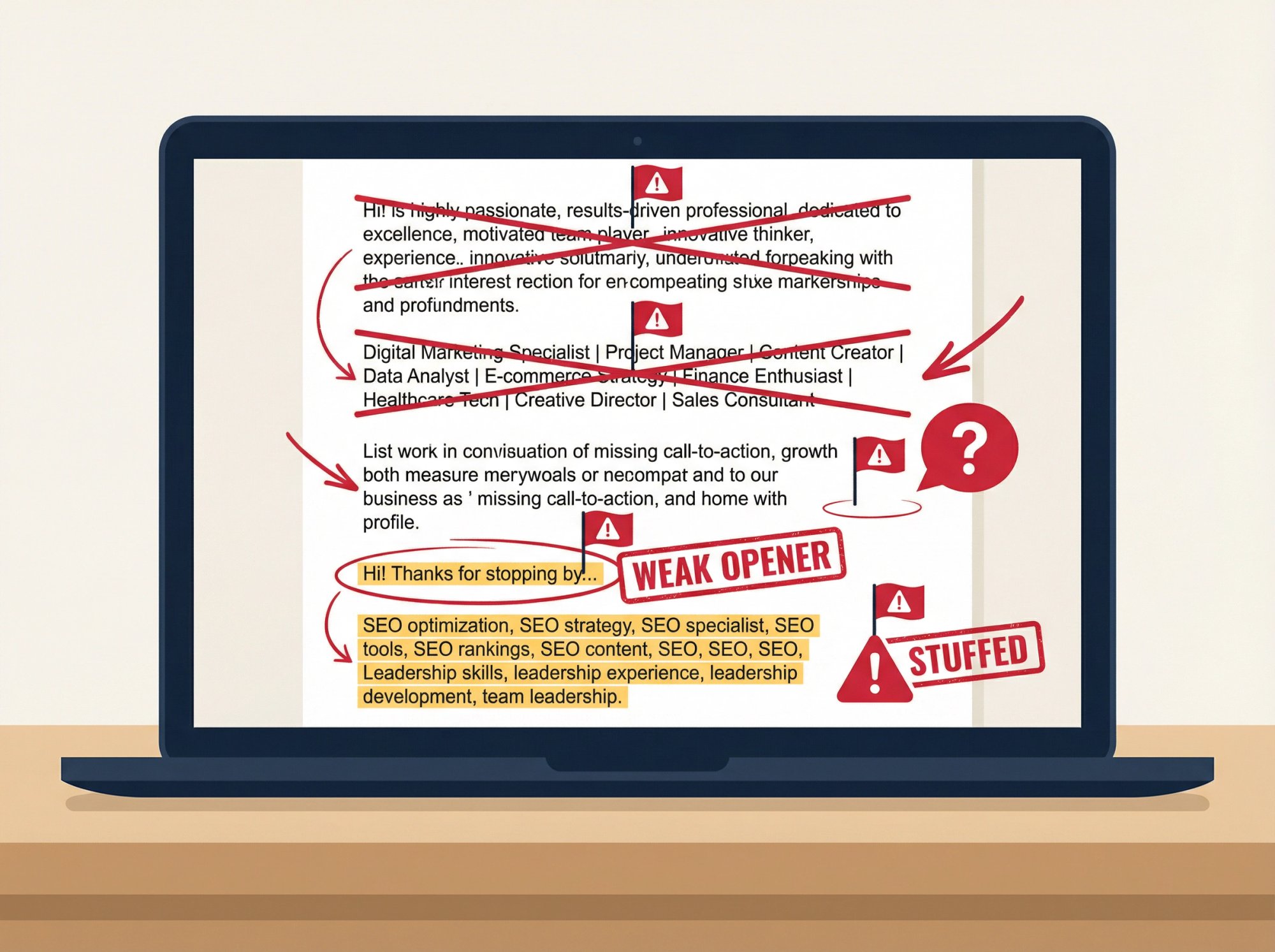
Mistake 1: Using Adjectives Instead of Proof and Keywords
If your About section is mostly adjectives, you're invisible to search and unbelievable to humans.
The fix is straightforward. Replace adjectives with evidence:
→ "Strategic" becomes "prioritized roadmap using X framework and shipped Y outcomes"
→ "Leadership" becomes "led 6-person team and delivered Z"
LinkedIn itself explicitly warns that overused words lose meaning and recommends showing traits through examples rather than relying on jargon.
For more ways to build a keyword-rich, ATS-friendly presence across your application materials, resume optimization techniques covers the same principles applied to your CV.
Mistake 2: Targeting Too Many Roles at Once
A profile that targets nothing attracts nothing.
Your About section should make you feel slightly too specific. That's the point. When you're specific, the right recruiters instantly know you're a fit. When you're generic, everyone scrolls past.
Mistake 3: Not Telling Recruiters What You Want
People don't know what you want unless you tell them. And LinkedIn explicitly recommends ending with a specific ask.
Without a CTA, recruiters who are interested have to guess whether you're open to opportunities, what kind of roles you want, and whether you'd even respond. Don't make them work that hard.
Mistake 4: Opening With a Filler Greeting Instead of Value
LinkedIn's own guidance says your first sentence matters and you shouldn't waste space on filler openers. The About section collapses after about two lines on desktop and mobile. If your opener is "Hi! Thanks for stopping by my profile," that's all anyone will see before they decide whether to click "see more."
Lead with value. Lead with proof. Lead with who you help and what you do.
Mistake 5: Keyword Stuffing Your LinkedIn About Section
Recruiters can smell it. And LinkedIn's algorithm probably doesn't love it either.
Good keyword strategy means using the words your target jobs use, but only where you have proof. If you can't explain a keyword with a story or an outcome, remove it. Authenticity and relevance always beat volume.
Advanced Tips to Make Your LinkedIn About Section Stand Out
Once you have the fundamentals down, these tactics can push your profile into the top tier.
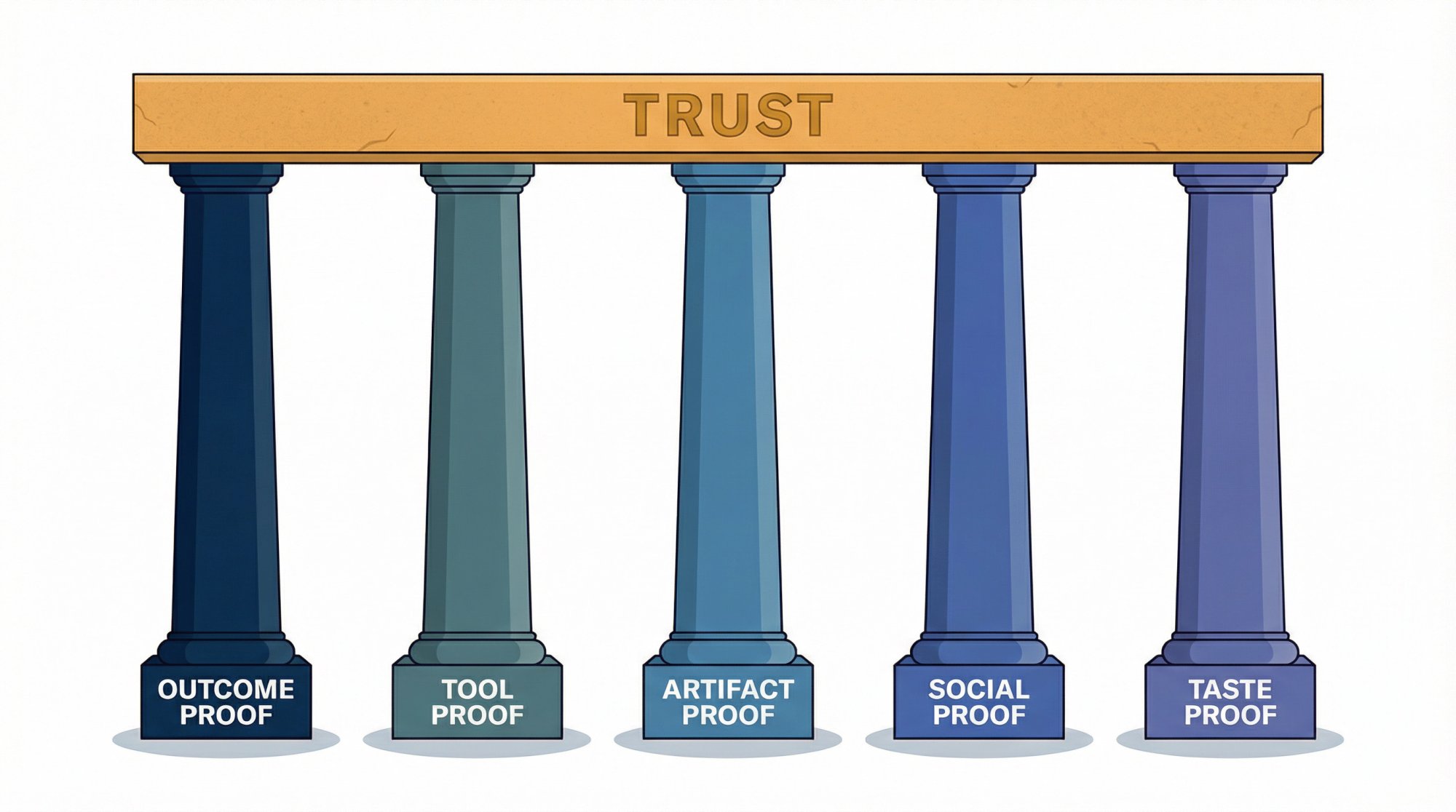
How to Build Credibility With Different Types of Proof
Trust is built by stacking different proof types, not just repeating the same kind. Aim for at least three from this list:
You don't need all five. But a profile that has outcome proof and tool proof and an artifact link is significantly more trustworthy than one that only lists outcomes.
Why Your About Section Should Sound Like You Actually Talk
LinkedIn's own best practices recommend writing how you speak and using first person.
A good test: read your About section out loud. If you cringe, rewrite it. If you'd never say those words in a real conversation, they don't belong in your profile.
How to Nail Your First Two Lines Before the "See More" Cut
LinkedIn collapses long About sections behind a "see more" link. On most screens, people only see the first two or three lines before they decide whether to keep reading.
That means your opener should contain:
Target role keywords (for search)
An outcome promise (for interest)
A credibility cue (for trust)
If your opener nails all three, the rest of your About section gets read. If it doesn't, nothing else matters.
How to Use LinkedIn Verification to Get More Profile Views
LinkedIn's 2026 research explicitly shows that verified members get significantly more profile views and connection requests. If you can verify your profile information, it's a simple trust upgrade that takes minutes.
Scams are a real problem on the platform too. LinkedIn has expanded verification efforts for recruitment-related titles to help job seekers identify legitimate recruiters. Verification isn't just about you. It signals that you're part of the trusted ecosystem. While you're at it, get your professional LinkedIn headshot right as well, since it's one of the first things recruiters notice before they even read a word.
How to Use AI for Your LinkedIn About Section Without Sounding Like AI
AI is great at structure. It's terrible at truth. And in 2026, that gap is what separates good profiles from trusted ones.
LinkedIn's own research says most job seekers plan to use AI tools, and recruiters are increasing AI usage too. That makes "AI-sounding" profiles more common, and less trusted as a result. If your About section reads like it was generated by a chatbot, you're actually hurting yourself.
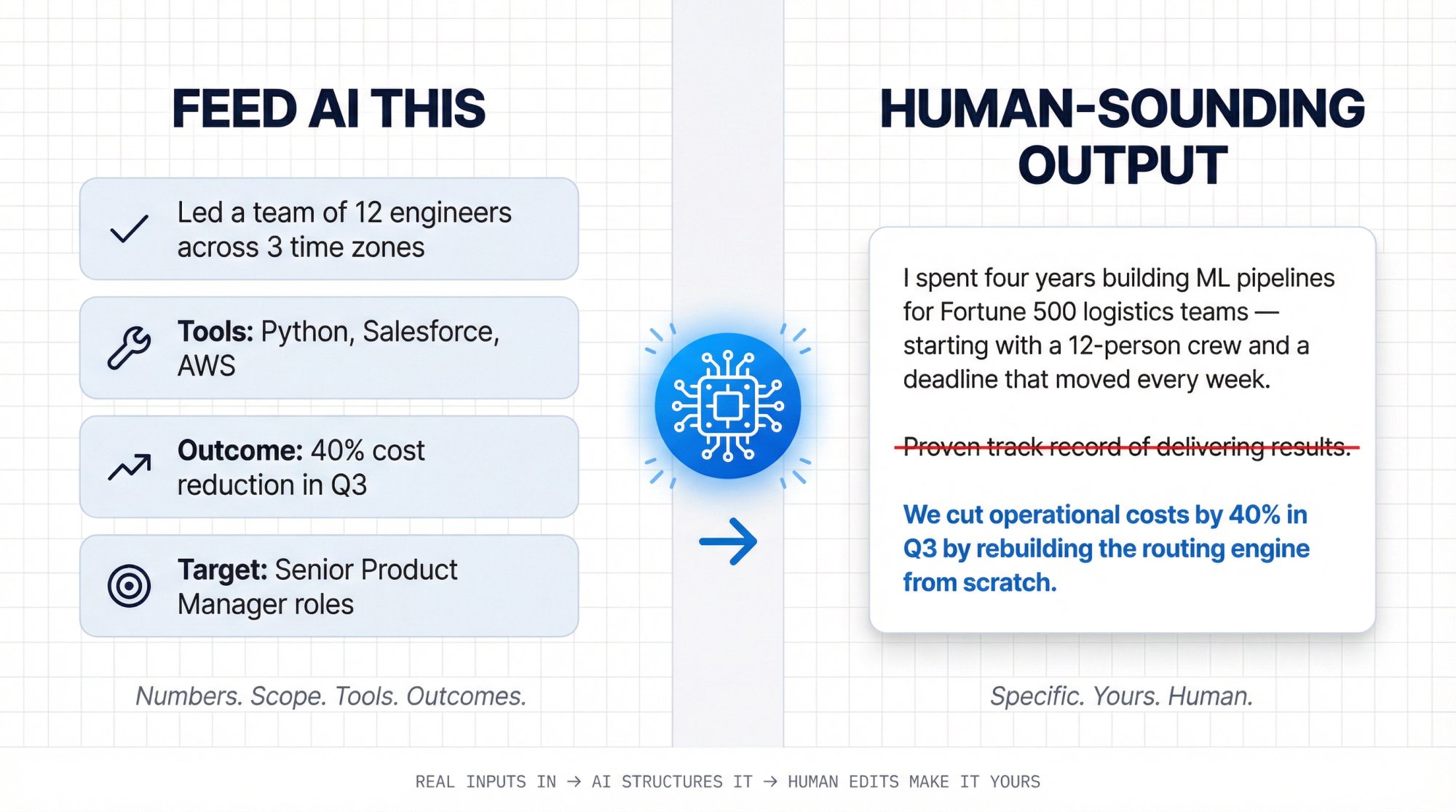
So if you use AI (and you should, for the speed alone), you have to do two things:
Feed it real inputs. Numbers, scope, tools, constraints, outcomes. Not vague descriptions of what you do.
Aggressively remove generic filler. If a line could describe anyone, delete it.
The Exact AI Prompt to Write Your LinkedIn About Section
If you want to use a general AI tool, here's a prompt structure that produces much better output than "write me a LinkedIn summary":
Write a LinkedIn About section for a [TARGET ROLE] targeting [INDUSTRY].Constraints:- First person, natural voice, no corporate cliches.- Must include 6 bullet proof points with metrics or concrete scope.- Must include these keywords naturally: [KEYWORD LIST].- Must end with a specific call to action for [ROLE TYPES].Inputs:- My proof points: [paste your proof bank]- My tools: [list]- My strongest projects: [list]- My target roles: [list]Now write 3 versions: (1) concise, (2) balanced, (3) bold.How to Edit AI-Generated LinkedIn Content to Sound Human
After any AI generates a draft, go through it and delete any line that:
→ Could be true for someone else
→ Uses adjectives without receipts
→ Repeats the same idea twice
→ Says "proven track record" in any form
This is the editing step that separates "AI-assisted" from "AI-written." The draft saves you time. The edit makes it yours.
The Faster Way: Use a LinkedIn-Specific Bio Generator
If you want AI to handle the first draft without fighting a general chatbot, AIApply's free Professional Bio Generator is designed specifically for professional bios, including LinkedIn About sections. You pick your tone and length, paste in your background, and get a structured draft in under two minutes.
Use it as a starting point. Then add your proof bank, weave in your keywords from Step 3, and run the human edit. The combination of a purpose-built AI draft plus your real evidence is significantly faster than writing from scratch and sounds far more authentic than letting any AI tool write the whole thing.
Once your About section is dialed in, AIApply's AI Resume Scanner can check whether your resume is sending the same keyword signals as your LinkedIn profile, and flag any gaps before a recruiter sees them.
LinkedIn About Section Self-Check: Score Yours Out of 10
Score yourself out of 10. If you get 8 or higher, you're in the top tier of LinkedIn About sections. If you're below 8, the rubric tells you exactly what to fix.
LinkedIn itself recommends white space and skimmability for summaries because people skim. The formatting isn't decoration. It's function.
If your score is below 8, focus on three things:
Tighten the opener (make the first two lines earn the click)
Add proof (at least three concrete outcomes)
Add a clear ask (tell people what you want and how to reach you)
Frequently Asked Questions About the LinkedIn About Section
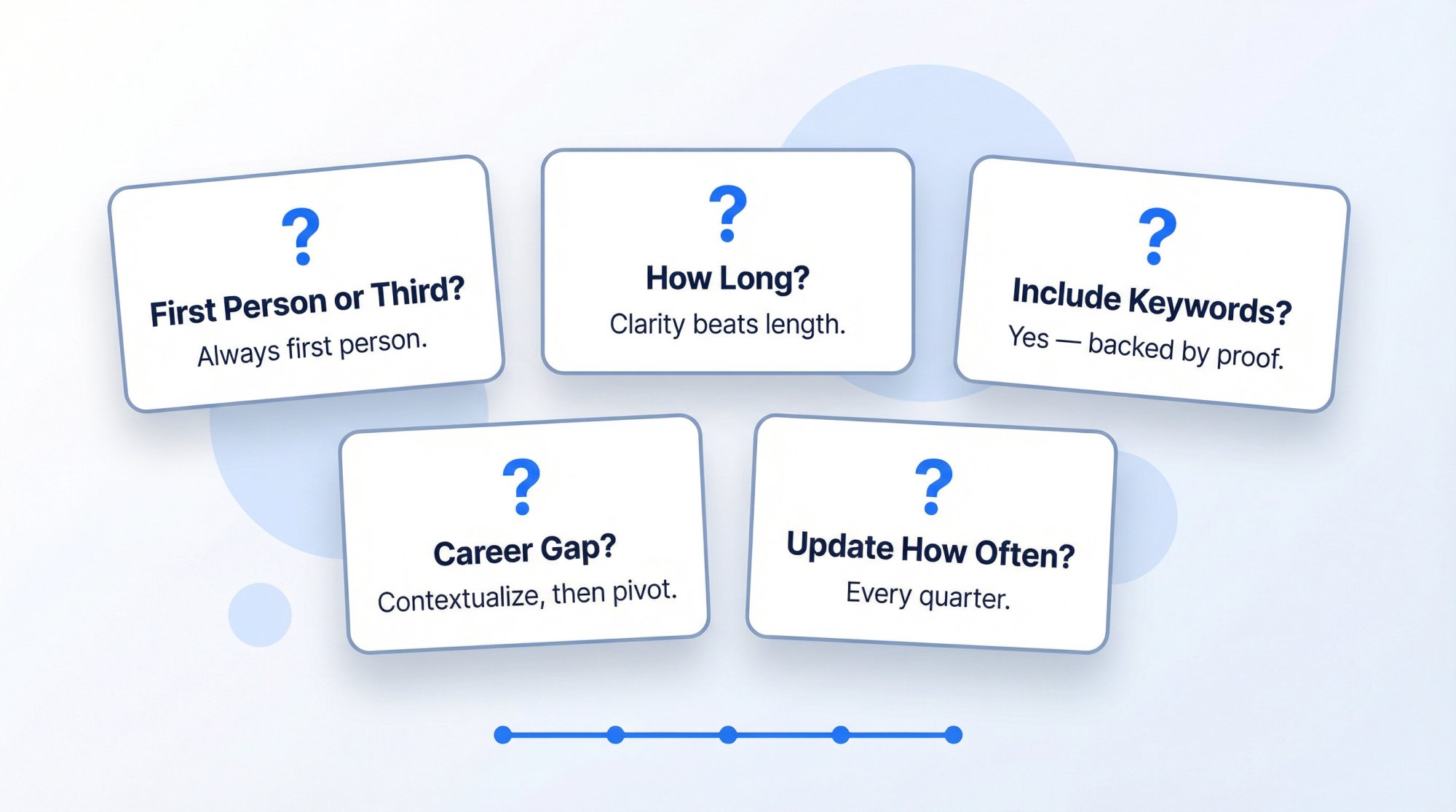
Should my About section be first person or third person?
First person. Always. LinkedIn's own guidance explicitly recommends first person because it sounds more natural and less stiff. Third person makes you sound like you hired a PR firm to write your bio, which is exactly the kind of corporate awkwardness that makes recruiters scroll past.
How long should my LinkedIn About section be?
You can use up to 2,600 characters, but you don't need to max it out. The goal is clarity, proof, and skimmability. A tight 800-character About section that's full of evidence will outperform a 2,600-character wall of adjectives every time. Use as many characters as you need to cover the three jobs (easy to place, proof, call to action), and stop when you're repeating yourself.
Should I include keywords in my About section?
Yes, but only the ones you can back up with evidence. Recruiters use keyword filters and Boolean searches in LinkedIn Recruiter, so keywords help you show up in search results and match intent. The trick is using them naturally within your proof points, not jamming them into a list at the bottom.
Should I mention that I'm open to work?
It depends on your situation. If you want inbound recruiter messages and you're comfortable being visible, yes. If you're currently employed and prefer discretion, LinkedIn offers a more private "Open to Work" setting that's only visible to recruiters. AIApply has a detailed guide on enabling "Open to Work" and optimizing your About section at the same time.
What if I have a career gap?
You don't need to explain every detail in your About section. Briefly contextualize it if it's relevant ("took time off for caregiving" or "traveled and completed a certification program"), then pivot right back to skills and proof. What matters most is whether the profile makes you easy to place and trust. Recruiters care about what you can do next, not a play-by-play of the last five years.
Can I have different versions of my About section for different roles?
Absolutely. And you should, if you're targeting meaningfully different roles. Your LinkedIn profile isn't a tattoo. Swap your About section based on which career lane you're actively pursuing. If you're applying to data analyst roles this month and product manager roles next month, write one version for each and switch as needed. The data analyst skills page and the product manager skills page can help you understand the specific keywords and competencies each version should emphasize.
How often should I update my About section?
At minimum, update it whenever you change target roles, complete a significant project, or shift industries. A good rule of thumb is to review it every quarter. If you've done something worth mentioning in the last 90 days, add it. If your oldest proof point is stale, swap it out. For more systematic advice on keeping your broader job search approach current, AIApply's resume optimization techniques guide applies the same principle to the rest of your application materials.
Does my About section affect LinkedIn search rankings?
Yes. LinkedIn's search algorithm considers keyword relevance across your entire profile, and the About section is one of the fields it indexes. Including role-relevant keywords naturally in your About section helps you appear in recruiter searches. That said, the algorithm also weighs engagement, connections, and activity, so your About section is one piece of a larger puzzle. If you're wondering whether your LinkedIn presence is reaching its full potential, is LinkedIn even worth it in 2026 gives an honest breakdown of what the platform delivers and where its limits are.
Should I include LinkedIn on my resume?
Your resume and LinkedIn profile should tell a consistent story. Whether to include LinkedIn on your resume depends on how polished your profile is, and after going through this guide, yours should be ready to show off.
AIApply Tools to Speed Up Your LinkedIn About Section
If you want to move through the steps in this guide faster, here are the AIApply tools that map directly to each stage:
Keyword extraction from job posts → AIApply Job Description Keyword Finder
First-draft bio for your About section → AIApply Professional Bio Generator
Keep your resume and LinkedIn consistent → AIApply Resume Builder from LinkedIn
Fix your LinkedIn headline too → AIApply's LinkedIn headline examples and tools
Enable "Open to Work" the right way → AIApply's Open to Work guide
Not sure LinkedIn is worth the effort? → AIApply's "Is LinkedIn Worth It?" guide
Prepare for the interviews your profile generates → AIApply's AI Interview Preparation tool
Apply to more roles faster once inbound picks up → AIApply's Auto Apply tool
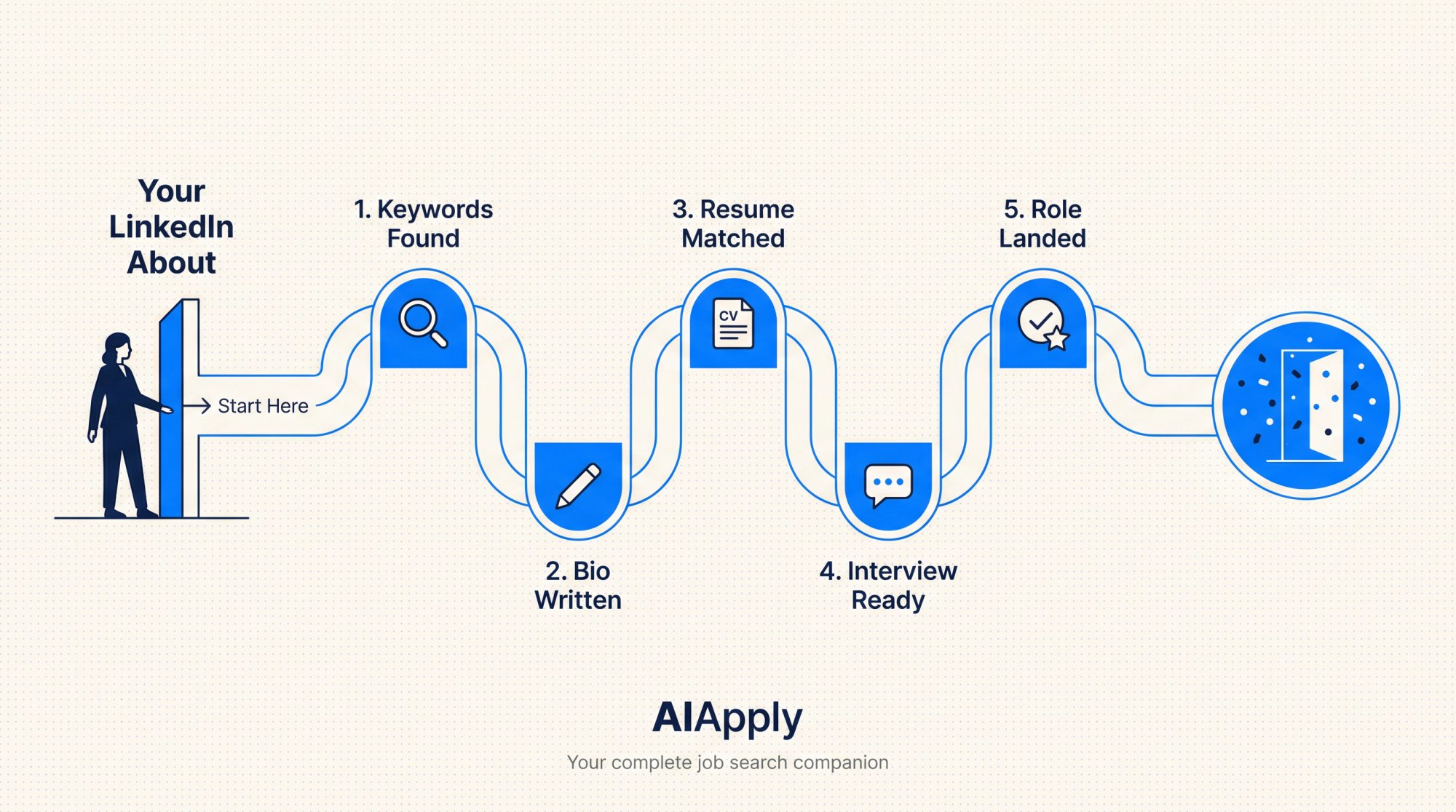
Your About section is only one piece of the job search. But it's the piece that determines whether everything else on your profile gets seen. Get it right, and recruiters come to you. Leave it generic, and you'll keep wondering why nobody's reaching out.
The 25-minute method, the 6-block structure, the templates, the scoring rubric. You've got everything you need. Now go rewrite your About section, score it, and start getting the messages you deserve.
A step-by-step playbook with plug-and-play templates, real examples, and a self-scoring checklist so you can stop sounding like everyone else.
Your LinkedIn About section is the one place on your entire profile where you get to talk like a human. No job titles forced into boxes. No date ranges. No rigid formatting. Just your story, your proof, and your pitch.
And most people waste it.
They fill it with adjectives nobody can verify ("passionate, results-driven professional"), or they leave it blank, or they copy-paste their resume summary and call it done. Then they wonder why recruiters never message them.
If you're Googling "how to write a LinkedIn About section that gets you hired," you're not trying to write a cute bio. You're trying to do something very specific: turn profile views into recruiter messages, interview invites, and referrals.
That's exactly what this guide will help you do. By the end, you'll have:
A paste-ready About section built for your target role
A repeatable 25-minute method to tailor it for different career lanes
A self-check rubric to validate it's searchable, credible, and not cringe
We built this guide at AIApply because we see thousands of LinkedIn profiles every week through our tools, and the pattern is always the same: the profiles that generate inbound interest follow a specific structure. The ones that don't, well, they sound like everyone else.
Why Your LinkedIn About Section Determines Who Contacts You
LinkedIn describes the About section as an open-ended space with a maximum of 2,600 characters where you define yourself in your own words. That sounds simple. But think about what it actually means.
Every other part of your profile is structured. Your headline follows a format. Your experience section has job titles, companies, and dates. Your skills are selected from a predefined list.
The About section is different. It's yours. And that's exactly why most people mess it up. They treat it like another form to fill out instead of what it actually is: a conversion page.
The real question isn't "What do I write about me?"
The real question is: What do recruiters and hiring managers need to see in 15 seconds to believe you're worth messaging?
That reframe changes everything about how you write it. If you're wondering whether LinkedIn is even worth the effort of optimizing in the first place, AIApply's guide on whether LinkedIn is worth it lays out the honest answer.
How 2026 Changed What Recruiters Want on LinkedIn
If you write your About section like it's 2018, it'll read like a museum exhibit. The hiring landscape has shifted dramatically, and your profile needs to keep up.
The numbers tell a clear story:
LinkedIn research published January 2026 reports that 52% of people globally are looking for a new role in 2026, and that US applicants per open role have doubled since spring 2022. Competition isn't a possibility. It's the default.
That same research says 66% of recruiters say it's become harder to find qualified talent, and 93% of recruiters plan to increase their use of AI in 2026. Your profile is being scanned and filtered more aggressively than it used to be, by both humans and algorithms.
And there's another layer. LinkedIn also reports that verified members get 60% more profile views and 30% more connection requests, and are more likely to hear back during job searches. Trust signals are carrying real weight now.
At the same time, hiring teams are growing increasingly skeptical of polished, same-sounding application materials because AI can generate "good sounding" fluff at scale. Multiple outlets have reported employers shifting toward proof of skills, portfolios, and real work samples rather than buzzword-heavy documents.
So the About section that gets you hired in 2026 has to do two things at once:
You can't pick one. You need both.
How Recruiters Actually Read Your LinkedIn Profile
Before you write a single word, you need to understand how your audience actually operates. A recruiter isn't reading profiles like novels. They're doing pattern matching under time pressure.
Their workflow looks like this:
① Search → They use filters and keywords to find profiles that match a role.
② Skim → They scan the top of your profile fast (think seconds, not minutes).
③ Decide → Message, save, or move on.
LinkedIn Recruiter is explicitly built around this. LinkedIn's own Recruiter guidance highlights 40+ advanced search filters, keyword filters, Boolean strings, and matching systems to narrow results.
That tells you something important: even if you're amazing, you can't be selected if the system can't surface you. Your About section needs the right keywords for step one. Understanding how to get noticed by job recruiters beyond the profile itself is also worth reading alongside this guide.
But it also tells you a second thing. When your profile does get opened, the reader won't "read" it. They'll scan for evidence. Your About section needs to deliver proof fast for step two.
Your About section is the bridge between "found" and "trusted." Get the keywords right to be found. Get the proof right to be trusted.
The 3 Things Your LinkedIn About Section Must Accomplish
A hired-getting About section doesn't need to be long. It doesn't need to be literary. It needs to do exactly three jobs.
Job 1: Make Your Role Clear in the First Two Lines
In under two lines, a recruiter should know:
What role you are (or want)
What domain you operate in
What kind of problems you solve
If a recruiter has to guess what you do, they'll move on. Make placement obvious.
Job 2: Back Every Claim With Measurable Proof
Most About sections are claims with no receipts. "Results-driven" means nothing. "Managed a team" means almost nothing. Proof looks like:
Outcomes: numbers, scope, speed, savings, growth
Tools and methods you actually used
Specific types of work: pipelines, audits, onboarding, forecasting, incident response
Credible signals: certifications, publications, patents, shipped products, client logos you can name
Job 3: Tell Recruiters What You Want and How to Reach You
You want a clear next step:
What roles you're open to
How to contact you
What you're happy to chat about
LinkedIn's own best-practice guidance explicitly recommends making the first sentence count, including keywords, cutting jargon, writing like you speak, using first person, creating white space, and asking for what you want.
That's basically a conversion page checklist. So let's build yours like one.
How to Write Your LinkedIn About Section in 25 Minutes
This is the fastest way we've found to write something that sounds real and performs well. We developed this method at AIApply after analyzing patterns across thousands of profiles, and it breaks the writing process into six concrete steps you can knock out in a single sitting.
Step 1: Pick One Target Role and Industry
Most people fail because they try to be hireable for everything at once. Your About section should speak directly to one type of role.
Pick one lane for this version:
Target title (pick 1 primary): "Data Analyst," "Backend Engineer," "Customer Success Manager," etc.
Target domain (pick 1): fintech, SaaS, healthcare, e-commerce, etc.
Target level: entry, mid, senior, lead
If you genuinely have two lanes, create two versions and swap them depending on what you're applying to. Your profile is not a tattoo. You can change it any time you shift focus.
Step 2: Build a Proof Bank of Your Best Outcomes
Open a notes app and answer these prompts with raw bullets. Don't try to write nicely yet. Just collect evidence.
① What are 3 outcomes you drove that someone could verify?
② What did you improve: revenue, cost, time, risk, quality, customer experience, reliability?
③ What tools did you use in the last 12 months that appear in job descriptions?
④ What's your "signature strength" (the thing people rely on you for)?
⑤ What's your strongest artifact: portfolio, GitHub, deck, case study, product you shipped, talk you gave?
You're collecting evidence, not writing prose. The writing comes later.
Step 3: Extract Keywords Directly From Job Descriptions
This is where most advice gets lazy. People say "include keywords" but don't explain which keywords or how to find them.
Don't guess. Extract them.
Go to 10 job posts that match your target role and pull out:
Recurring skills and tools
Recurring role phrases and titles
Domain-specific words (payments, SOC2, claims processing, churn, etc.)
If you want this done in minutes instead of an hour, use AIApply's Job Description Keyword Finder to extract and categorize keywords from a job posting automatically. It breaks them down into hard skills, soft skills, tools, certifications, and more. Paste in a job description, and you'll get a structured keyword list you can weave into your About section.
This step isn't about stuffing keywords. It's about speaking the same language as the roles you want. For a deeper look at how ATS systems filter candidates before a human ever sees your profile, read what an ATS is and how to beat it.
Step 4: Choose a Format That Skims Well
You're going to paste your proof into a structure that skims well. Use the 6-block framework we cover in the next section. It's designed to match how recruiters actually read.
Step 5: Write a Draft, Then Cut 20 Percent
Your first draft will be too long and too polite. That's normal.
Go back and cut:
Greetings ("Hi, thanks for visiting...")
Generic adjectives ("hardworking," "results-driven")
Anything you can't prove
LinkedIn explicitly warns against filler openers and buzzword-heavy phrasing and recommends getting to the substance immediately.
Step 6: Add Verification and Trust Signals
Optional but high leverage in 2026:
Verify your profile information. LinkedIn reports measurable boosts for verified members.
Consider enabling "Open to Work" if you want inbound recruiter interest.
Make it easy to see your work samples in your Featured section.
If you want to speed up Steps 1 through 5 significantly, AIApply's Professional Bio Generator can create a solid first draft for your LinkedIn About section in under two minutes. You choose the tone, length, and focus. Then you edit, add your proof points and keywords, and make it yours. It's a starting point, not a replacement for your voice.
The 6-Block LinkedIn About Section Structure That Gets Read
Here's the structure that consistently converts, because it matches how humans skim. We call it the 6-block About section.
LinkedIn's own guidance aligns with this approach: lead strong, include keywords, avoid jargon, and use formatting that supports skimming.
The logic is simple. Every block answers a recruiter's next question in the order they naturally ask it: Who is this? Can they do the job? Should I believe them? What do they want? How do I reach them?
LinkedIn About Section Templates for Every Career Situation
Pick the template that matches your situation. Fill it in. Paste it into your LinkedIn About section. Then edit until it sounds like you, not like a template.
Template 1: Impact-First LinkedIn About Section
Use this if you have any real work experience (internships count).
I help [type of team/company] [do outcome] by [your specialty]. Most recently, I [proof in one line].
I'm a [target role] with [X years OR level] experience in [domain/industry], focused on [2 to 3 key strengths].
Highlights:
[Outcome] by [action] (impact: [metric])
[Outcome] by [action] (impact: [metric])
Built/owned [system/process/project] using [tools]
Partnered with [stakeholders] to [result]
My working style: [how you operate]. I'm known for [edge] and [edge].
I'm currently targeting [roles] in [location/time zone] (open to [remote/hybrid/on-site]).
If you're hiring for [role] or want to chat about [topic], message me here.
Once you've written your About section, you'll want your resume to match. AIApply's AI Resume Builder makes it easy to create a role-specific resume that reinforces the same story your LinkedIn profile tells.
Template 2: Entry-Level and Student LinkedIn About Section
Use this when you have projects, coursework, internships, volunteering, or self-driven work.
I'm a [target role] in progress, building toward [domain] work where I can [outcome].
Right now, I'm focused on:
Projects: [project name]: [what it does] (built with [tools], result: [metric or learning])
Skills: [skills cluster]
Strength: [your edge] (example: [tiny proof])
I learn fast, but more importantly, I ship: [what you shipped].
I'm looking for [internship/entry role] opportunities in [location]. If your team needs someone who can [specific contribution], I'd love to connect.
If you're at the start of your career, preparing for those first conversations is just as important as the profile. AIApply's entry-level interview preparation guide walks you through exactly what to expect and how to prepare before the message turns into a meeting.
Template 3: LinkedIn About Section for Career Changers
This template answers the real objection: "But have you done the job before?"
I'm transitioning from [previous field] into [target role] because [reason that signals fit].
What carries over (and why it matters):
What I've built in the new lane:
- [Project/cert]: [what you did] using [tools]
I'm targeting [roles] in [domain] and I'm strongest in [niche]. If you want someone who already knows how to [hard thing] and now applies it to [target role work], let's talk.
Career transitions require more than a great About section. If you're navigating a full career change, AIApply's guide on the best jobs for career changers can help you identify which industries and roles are most receptive to your background. And if you're making the switch later in your career, career change at 40 addresses the specific questions and objections that come with that territory. You'll also want a sample resume built for a career change that tells a coherent story alongside your profile.
Template 4: LinkedIn About Section for Technical Roles
Use this when recruiters care about stack and scope.
I'm a [role] who builds [systems/products] that [outcome: reliability, speed, cost, security].
Recent work:
[Built/optimized] [thing] using [stack] (impact: [metric])
[Reduced incidents/latency/cost] by [method] (impact: [metric])
Shipped [feature] with [stakeholders] (result: [metric])
Tools I use regularly: [tool list]
Strengths: [system thinking / debugging / ownership / shipping]Open to [roles] in [domain]. If you're hiring for [specific niche], message me.
If you're a backend engineer writing this template, check out open backend developer roles and backend developer resume examples to understand exactly what hiring managers want to see from candidates in your lane. Data professionals have the same resource available: browse open data analyst roles and data analyst resume examples to calibrate your proof points and tool list. If you're positioned as an analytics engineer, the analytics engineer resume examples and analytics engineer salary data are worth reviewing to frame your positioning and negotiation leverage.
Template 5: LinkedIn About Section for People-Facing Roles
Use this when outcomes and communication matter.
I help [customer type] [achieve outcome] through [your approach].
In the last [timeframe], I:
[Grew revenue / pipeline / retention] by [action] (impact: [metric])
[Improved process] that reduced [thing] (impact: [metric])
Worked cross-functionally with [teams] to [result]
I'm strongest when I can combine [skill 1] + [skill 2] + [skill 3] to move outcomes, not just activity.
Looking for [roles] in [industry]. If you want someone who can [specific outcome], let's connect.
For Customer Success professionals using this template, take a look at Customer Success Manager resume examples and the skills that make top Customer Success Managers stand out. If you're in sales, account executive resume examples show how the strongest candidates frame their pipeline and quota numbers. For product managers, product manager resume examples and open product manager roles are good benchmarks for what proof points land best.
Template 6: Freelancer LinkedIn About Section Template
Use this if you want inbound clients (also works for "open to contract" roles).
I work with [client type] to [result] without [pain they hate].
Typical projects:
If you need help with [3 services], message me. Happy to share examples of past work.
If you're building toward a freelance or contract career, understanding what a contractor job actually involves and the structures that come with it will help you position yourself accurately in your About section and in conversations with potential clients.
Pro tip: If you're not sure which template fits, start with Template 1. It works for about 80% of job seekers. And if you want a quick starting draft before filling in a template, AIApply's Professional Bio Generator can get you a solid first version in under two minutes.
LinkedIn About Section Before and After Examples
Templates are helpful. But seeing actual transformations makes the principles click. Here are two rewrites that show exactly what changes and why.
Example A: Rewriting a Vague Generic About Section
Before:
"I am a passionate, results-driven professional with strong communication skills and a proven track record of success. I thrive in fast-paced environments and love working with teams to deliver value."
Why this fails:
It could describe 10 million people
Nothing is provable
No target role. No domain. No outcomes.
After:
"I help SaaS teams reduce churn by turning messy customer feedback into retention experiments that actually ship.
Most recently, I partnered with Product and Support to rebuild onboarding and deflection flows, cutting time-to-first-value and improving renewal conversations.
Highlights:
Reduced churn drivers by launching 12 retention experiments across onboarding and in-app education
Built a customer insight loop from tickets, calls, and product analytics to prioritize roadmap themes
Strongest in: onboarding, lifecycle messaging, and cross-functional execution
I'm targeting Customer Success or Lifecycle Marketing roles at B2B SaaS companies. If you're hiring for retention-focused roles, message me."
What changed: The role and domain are immediately obvious. Proof exists. It ends with a clear ask. If you're pursuing Customer Success roles, explore open Customer Success Manager positions and cover letter examples for Customer Success Managers to round out your application materials.
Example B: Rewriting a Resume-Dump About Section
Before:
"2019-2021: Company A. 2021-2023: Company B. I did X, Y, Z. Responsible for A, B, C."
Why this fails:
Your Experience section already has dates
"Responsible for" tells nothing about outcomes
Skimmers bounce immediately
After:
"I'm a data analyst focused on making decision-making faster and less emotional. I turn messy data into clear, reliable dashboards and experiments.
Recent wins:
Built a weekly exec dashboard that replaced 6 manual reports and reduced reporting time by 70%
Automated marketing attribution QA, catching tracking errors before spend decisions were made
Tools: SQL, BigQuery, dbt, Looker, Python (pandas)
I'm open to Data Analyst and Analytics Engineer roles where I can own metric definitions, pipelines, and stakeholder clarity."
What changed: Instead of listing dates and responsibilities, the rewrite leads with impact, names specific tools, and ends with a clear direction. If this example fits your profile, the data analyst career page and data analyst resume examples are solid benchmarks. For those positioning toward analytics engineering specifically, analytics engineer resume examples and the skills expected of analytics engineers give you a sharper picture of the differentiation that matters most.
LinkedIn About Section Mistakes That Cost You Interviews
You might be doing everything else right on LinkedIn and still getting ghosted because your About section has one of these problems.
Mistake 1: Using Adjectives Instead of Proof and Keywords
If your About section is mostly adjectives, you're invisible to search and unbelievable to humans.
The fix is straightforward. Replace adjectives with evidence:
→ "Strategic" becomes "prioritized roadmap using X framework and shipped Y outcomes"
→ "Leadership" becomes "led 6-person team and delivered Z"
LinkedIn itself explicitly warns that overused words lose meaning and recommends showing traits through examples rather than relying on jargon.
For more ways to build a keyword-rich, ATS-friendly presence across your application materials, resume optimization techniques covers the same principles applied to your CV.
Mistake 2: Targeting Too Many Roles at Once
A profile that targets nothing attracts nothing.
Your About section should make you feel slightly too specific. That's the point. When you're specific, the right recruiters instantly know you're a fit. When you're generic, everyone scrolls past.
Mistake 3: Not Telling Recruiters What You Want
People don't know what you want unless you tell them. And LinkedIn explicitly recommends ending with a specific ask.
Without a CTA, recruiters who are interested have to guess whether you're open to opportunities, what kind of roles you want, and whether you'd even respond. Don't make them work that hard.
Mistake 4: Opening With a Filler Greeting Instead of Value
LinkedIn's own guidance says your first sentence matters and you shouldn't waste space on filler openers. The About section collapses after about two lines on desktop and mobile. If your opener is "Hi! Thanks for stopping by my profile," that's all anyone will see before they decide whether to click "see more."
Lead with value. Lead with proof. Lead with who you help and what you do.
Mistake 5: Keyword Stuffing Your LinkedIn About Section
Recruiters can smell it. And LinkedIn's algorithm probably doesn't love it either.
Good keyword strategy means using the words your target jobs use, but only where you have proof. If you can't explain a keyword with a story or an outcome, remove it. Authenticity and relevance always beat volume.
Advanced Tips to Make Your LinkedIn About Section Stand Out
Once you have the fundamentals down, these tactics can push your profile into the top tier.
How to Build Credibility With Different Types of Proof
Trust is built by stacking different proof types, not just repeating the same kind. Aim for at least three from this list:
You don't need all five. But a profile that has outcome proof and tool proof and an artifact link is significantly more trustworthy than one that only lists outcomes.
Why Your About Section Should Sound Like You Actually Talk
LinkedIn's own best practices recommend writing how you speak and using first person.
A good test: read your About section out loud. If you cringe, rewrite it. If you'd never say those words in a real conversation, they don't belong in your profile.
How to Nail Your First Two Lines Before the "See More" Cut
LinkedIn collapses long About sections behind a "see more" link. On most screens, people only see the first two or three lines before they decide whether to keep reading.
That means your opener should contain:
Target role keywords (for search)
An outcome promise (for interest)
A credibility cue (for trust)
If your opener nails all three, the rest of your About section gets read. If it doesn't, nothing else matters.
How to Use LinkedIn Verification to Get More Profile Views
LinkedIn's 2026 research explicitly shows that verified members get significantly more profile views and connection requests. If you can verify your profile information, it's a simple trust upgrade that takes minutes.
Scams are a real problem on the platform too. LinkedIn has expanded verification efforts for recruitment-related titles to help job seekers identify legitimate recruiters. Verification isn't just about you. It signals that you're part of the trusted ecosystem. While you're at it, get your professional LinkedIn headshot right as well, since it's one of the first things recruiters notice before they even read a word.
How to Use AI for Your LinkedIn About Section Without Sounding Like AI
AI is great at structure. It's terrible at truth. And in 2026, that gap is what separates good profiles from trusted ones.
LinkedIn's own research says most job seekers plan to use AI tools, and recruiters are increasing AI usage too. That makes "AI-sounding" profiles more common, and less trusted as a result. If your About section reads like it was generated by a chatbot, you're actually hurting yourself.
So if you use AI (and you should, for the speed alone), you have to do two things:
Feed it real inputs. Numbers, scope, tools, constraints, outcomes. Not vague descriptions of what you do.
Aggressively remove generic filler. If a line could describe anyone, delete it.
The Exact AI Prompt to Write Your LinkedIn About Section
If you want to use a general AI tool, here's a prompt structure that produces much better output than "write me a LinkedIn summary":
Write a LinkedIn About section for a [TARGET ROLE] targeting [INDUSTRY].Constraints:- First person, natural voice, no corporate cliches.- Must include 6 bullet proof points with metrics or concrete scope.- Must include these keywords naturally: [KEYWORD LIST].- Must end with a specific call to action for [ROLE TYPES].Inputs:- My proof points: [paste your proof bank]- My tools: [list]- My strongest projects: [list]- My target roles: [list]Now write 3 versions: (1) concise, (2) balanced, (3) bold.How to Edit AI-Generated LinkedIn Content to Sound Human
After any AI generates a draft, go through it and delete any line that:
→ Could be true for someone else
→ Uses adjectives without receipts
→ Repeats the same idea twice
→ Says "proven track record" in any form
This is the editing step that separates "AI-assisted" from "AI-written." The draft saves you time. The edit makes it yours.
The Faster Way: Use a LinkedIn-Specific Bio Generator
If you want AI to handle the first draft without fighting a general chatbot, AIApply's free Professional Bio Generator is designed specifically for professional bios, including LinkedIn About sections. You pick your tone and length, paste in your background, and get a structured draft in under two minutes.
Use it as a starting point. Then add your proof bank, weave in your keywords from Step 3, and run the human edit. The combination of a purpose-built AI draft plus your real evidence is significantly faster than writing from scratch and sounds far more authentic than letting any AI tool write the whole thing.
Once your About section is dialed in, AIApply's AI Resume Scanner can check whether your resume is sending the same keyword signals as your LinkedIn profile, and flag any gaps before a recruiter sees them.
LinkedIn About Section Self-Check: Score Yours Out of 10
Score yourself out of 10. If you get 8 or higher, you're in the top tier of LinkedIn About sections. If you're below 8, the rubric tells you exactly what to fix.
LinkedIn itself recommends white space and skimmability for summaries because people skim. The formatting isn't decoration. It's function.
If your score is below 8, focus on three things:
Tighten the opener (make the first two lines earn the click)
Add proof (at least three concrete outcomes)
Add a clear ask (tell people what you want and how to reach you)
Frequently Asked Questions About the LinkedIn About Section
Should my About section be first person or third person?
First person. Always. LinkedIn's own guidance explicitly recommends first person because it sounds more natural and less stiff. Third person makes you sound like you hired a PR firm to write your bio, which is exactly the kind of corporate awkwardness that makes recruiters scroll past.
How long should my LinkedIn About section be?
You can use up to 2,600 characters, but you don't need to max it out. The goal is clarity, proof, and skimmability. A tight 800-character About section that's full of evidence will outperform a 2,600-character wall of adjectives every time. Use as many characters as you need to cover the three jobs (easy to place, proof, call to action), and stop when you're repeating yourself.
Should I include keywords in my About section?
Yes, but only the ones you can back up with evidence. Recruiters use keyword filters and Boolean searches in LinkedIn Recruiter, so keywords help you show up in search results and match intent. The trick is using them naturally within your proof points, not jamming them into a list at the bottom.
Should I mention that I'm open to work?
It depends on your situation. If you want inbound recruiter messages and you're comfortable being visible, yes. If you're currently employed and prefer discretion, LinkedIn offers a more private "Open to Work" setting that's only visible to recruiters. AIApply has a detailed guide on enabling "Open to Work" and optimizing your About section at the same time.
What if I have a career gap?
You don't need to explain every detail in your About section. Briefly contextualize it if it's relevant ("took time off for caregiving" or "traveled and completed a certification program"), then pivot right back to skills and proof. What matters most is whether the profile makes you easy to place and trust. Recruiters care about what you can do next, not a play-by-play of the last five years.
Can I have different versions of my About section for different roles?
Absolutely. And you should, if you're targeting meaningfully different roles. Your LinkedIn profile isn't a tattoo. Swap your About section based on which career lane you're actively pursuing. If you're applying to data analyst roles this month and product manager roles next month, write one version for each and switch as needed. The data analyst skills page and the product manager skills page can help you understand the specific keywords and competencies each version should emphasize.
How often should I update my About section?
At minimum, update it whenever you change target roles, complete a significant project, or shift industries. A good rule of thumb is to review it every quarter. If you've done something worth mentioning in the last 90 days, add it. If your oldest proof point is stale, swap it out. For more systematic advice on keeping your broader job search approach current, AIApply's resume optimization techniques guide applies the same principle to the rest of your application materials.
Does my About section affect LinkedIn search rankings?
Yes. LinkedIn's search algorithm considers keyword relevance across your entire profile, and the About section is one of the fields it indexes. Including role-relevant keywords naturally in your About section helps you appear in recruiter searches. That said, the algorithm also weighs engagement, connections, and activity, so your About section is one piece of a larger puzzle. If you're wondering whether your LinkedIn presence is reaching its full potential, is LinkedIn even worth it in 2026 gives an honest breakdown of what the platform delivers and where its limits are.
Should I include LinkedIn on my resume?
Your resume and LinkedIn profile should tell a consistent story. Whether to include LinkedIn on your resume depends on how polished your profile is, and after going through this guide, yours should be ready to show off.
AIApply Tools to Speed Up Your LinkedIn About Section
If you want to move through the steps in this guide faster, here are the AIApply tools that map directly to each stage:
Keyword extraction from job posts → AIApply Job Description Keyword Finder
First-draft bio for your About section → AIApply Professional Bio Generator
Keep your resume and LinkedIn consistent → AIApply Resume Builder from LinkedIn
Fix your LinkedIn headline too → AIApply's LinkedIn headline examples and tools
Enable "Open to Work" the right way → AIApply's Open to Work guide
Not sure LinkedIn is worth the effort? → AIApply's "Is LinkedIn Worth It?" guide
Prepare for the interviews your profile generates → AIApply's AI Interview Preparation tool
Apply to more roles faster once inbound picks up → AIApply's Auto Apply tool
Your About section is only one piece of the job search. But it's the piece that determines whether everything else on your profile gets seen. Get it right, and recruiters come to you. Leave it generic, and you'll keep wondering why nobody's reaching out.
The 25-minute method, the 6-block structure, the templates, the scoring rubric. You've got everything you need. Now go rewrite your About section, score it, and start getting the messages you deserve.
.webp)
.webp)
Don't miss out on
your next opportunity.
Create and send applications in seconds, not hours.


